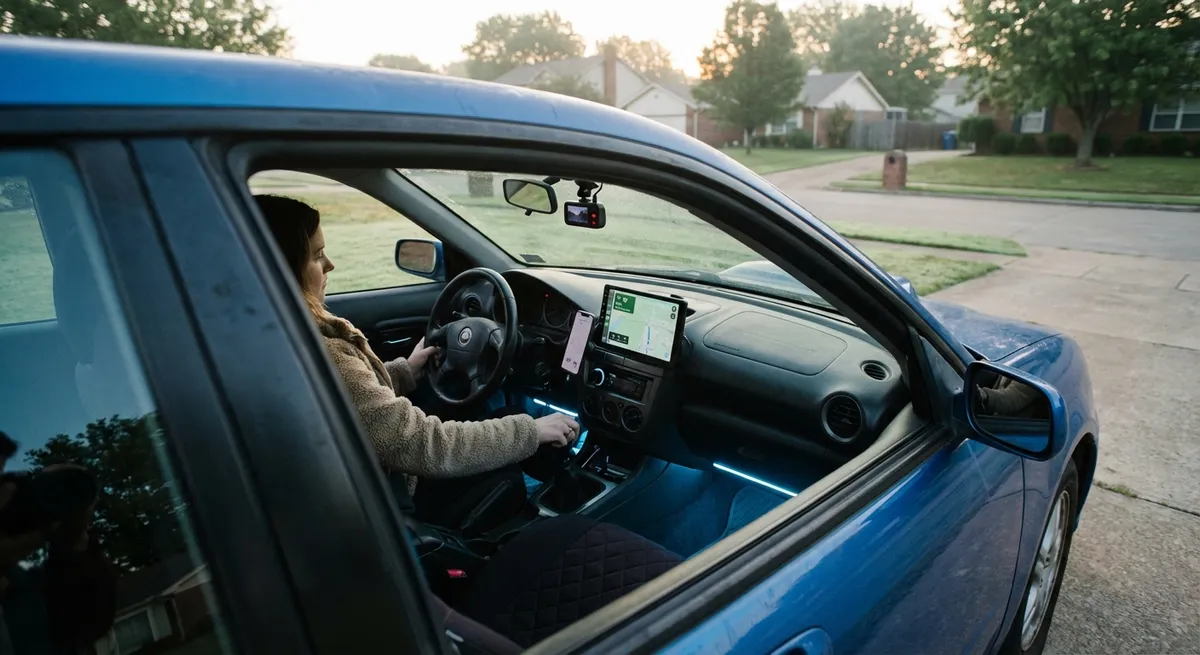
Turn Your Phone Into a Smarter Dash With Wireless Connectivity
Most cars built before the late 2010s lack native Apple CarPlay or Android Auto, but you can still get many of the benefits using your existing smartphone—if you set it up right.
Look for a sturdy, positionable phone mount that keeps your screen near eye level without blocking airbags or major vents. A windshield or dash mount with an articulating arm usually works best; avoid mounts that clamp to flimsy trim pieces. Pair it with a high-quality USB or USB‑C cable and a fast-charging adapter that supports at least 18W; this helps your phone keep up with navigation and streaming.
Next, configure “Do Not Disturb While Driving” or the equivalent mode on your phone so calls and notifications don’t constantly grab your attention. Use a dedicated navigation app that supports offline maps in case you lose service. Finally, spend 10–15 minutes customizing your home screen layout and voice assistant shortcuts for on-the-road use (navigation, calls, and music as the top actions). You’ve effectively created a DIY infotainment system that’s flexible and upgradeable every time you replace your phone.
Actionable point #1:
Set up a safe, eye-level phone mounting and charging setup, then configure driving-focused settings (Do Not Disturb, voice commands, offline maps) before your next trip.
Add Modern Safety Features With a Dash Cam and Smart Alerts
A well-chosen dash cam is more than a “just in case” gadget—it can protect you in an accident, discourage fraud, and even help you improve your driving. Modern units record in 1080p or 4K, capture details like license plates, and often include impact sensors that auto-save crucial clips.
Look for a model with a wide field of view (around 140–160 degrees), good low‑light performance, and loop recording on a sizable microSD card (64GB or more for daily commuting). Some models add driver assistance alerts: forward collision warnings, lane departure warnings, or stop‑and‑go prompts. While they’re not as refined as factory systems, they can give you helpful nudges in dense traffic or long highway drives.
Many dash cams also support parking mode, which uses motion or impact detection to record while the car is off. This is useful if you often park on the street or in public garages. Hardwiring kits let the camera draw power safely without draining your battery, but if you’re not comfortable with wiring, consider professional installation.
Actionable point #2:
Install a dash cam with impact sensing and parking mode, and regularly back up important clips to cloud storage or a computer so you always have evidence if something happens.
Upgrade Night and Bad-Weather Visibility With Better Lighting
Improved lighting is one of the most noticeable tech-related upgrades for older vehicles, and it pays off every time you drive at night or in poor weather. You don’t necessarily need to jump straight to aftermarket LED or HID kits; simply replacing old, cloudy halogen bulbs and cleaning headlight lenses can dramatically improve output.
Start by inspecting your headlight covers. If they’re yellowed or hazy, use a headlight restoration kit to clear the plastic and restore transparency. Then consider premium halogen bulbs from reputable brands that are designed for higher brightness and better beam patterns while remaining road‑legal. If you do step up to LED replacements, make sure they’re specifically designed for your headlight housing type and check local regulations, since poorly matched bulbs can cause glare for other drivers.
Beyond headlights, you can upgrade interior bulbs to LEDs for a brighter cabin and swap weak factory reverse lights for higher‑output options that make backing up in dark areas less stressful. Small lighting changes can make your car feel more modern and safer without heavy modifications.
Actionable point #3:
Restore cloudy headlight lenses and install quality, road‑legal upgraded bulbs, then verify beam aim on a flat surface so you maximize visibility without blinding other drivers.
Use OBD-II Tools to Track Health Before Problems Get Expensive
Your car’s onboard diagnostics (OBD-II) port is a direct line to how the vehicle is feeling. Instead of waiting for a check-engine light and hoping for the best, you can use a compact Bluetooth OBD-II adapter and a smartphone app to monitor key systems in real time.
These adapters plug into the port (usually under the dashboard near the steering column) and send data such as engine load, coolant temperature, fuel trims, and error codes to your phone. Good apps let you read trouble codes, view live data graphs, and even create custom dashboards. While you don’t need to become a full-time amateur mechanic, learning what “normal” looks like for your car makes it easier to catch developing issues—like a thermostat problem, misfire, or fuel system issue—before they turn into breakdowns.
Some apps also track driving habits, fuel economy, and maintenance intervals. This can help you spot trends, like mileage slowly dropping over months, which could signal tire, alignment, or engine efficiency issues. Make sure to choose an adapter from a reputable brand; very cheap units can be unreliable or introduce connection problems.
Actionable point #4:
Install a reputable Bluetooth OBD-II adapter, log a few weeks of normal driving data, and get comfortable reading basic codes so you can have more informed conversations with your mechanic.
Add Practical Parking and Blind-Spot Help Without Replacing Your Car
If your car lacks factory parking sensors or a backup camera, you’re missing out on a major safety and convenience upgrade that newer cars treat as standard. Fortunately, there are aftermarket solutions that don’t require replacing your entire infotainment system.
Universal backup camera kits pair a small camera—often mounted near the license plate—with a separate screen (frequently integrated into a rearview mirror replacement or a small dash-mounted display). When wired to the reverse light circuit, the camera activates automatically when you shift into reverse. High-quality units offer clear images in low light and on-screen guide lines that approximate your vehicle’s width and path.
Blind-spot assistance is another area where modest tech can make daily driving less stressful. Simple sensor systems mount in the rear bumper and trigger visual or audible alerts when vehicles sit in your blind spots. While they’re not as seamless as factory systems and can sometimes give false alerts, they’re still a meaningful aid when changing lanes on busy highways—especially in larger vehicles with poor rear visibility.
Actionable point #5:
Install an aftermarket backup camera kit or blind-spot monitoring system and spend time practicing in an empty lot so you understand its range, limitations, and how it complements (not replaces) mirror checks.
Conclusion
You don’t have to trade in your current car to benefit from modern auto tech. By carefully adding a few focused upgrades—smarter phone integration, a quality dash cam, better lighting, health-monitoring tools, and practical parking aids—you can noticeably improve safety, comfort, and confidence behind the wheel. Start with the area that annoys or worries you most in your daily drive, make one upgrade at a time, and give yourself a week or two to adapt. The right tech doesn’t just add gadgets; it makes every mile feel easier and more controlled.
Sources
- National Highway Traffic Safety Administration (NHTSA) – Vehicle Safety Technology – Overview of modern safety technologies like backup cameras and driver assistance features.
- AAA – Headlights: Shed Some Light on the Subject – Research on headlight degradation and why restoring or upgrading lighting improves nighttime safety.
- Consumer Reports – Dash Cam Buying Guide – Practical advice on choosing and installing dash cams, plus key features to look for.
- Federal Trade Commission – Connected Cars and Your Privacy – Background on how modern car tech and apps interact with your data and privacy.
- Edmunds – What Is OBD-II? – Explanation of OBD-II systems, ports, and how drivers can use scanners and apps to understand vehicle health.