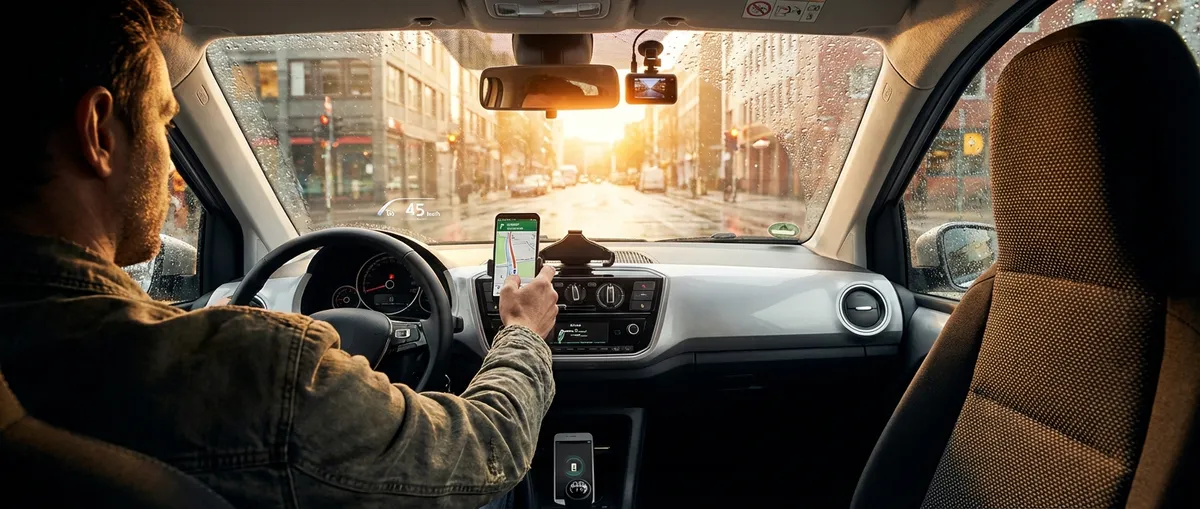
This guide focuses on practical, real-world adjustments—not gimmicks—so you get clear benefits whether you drive a five-year-old compact or a fresh-off-the-lot SUV.
Dialing In Driver Assistance So It Works With You, Not Against You
Advanced driver-assistance systems (ADAS) like lane-keeping assist, forward collision warning, and adaptive cruise control can reduce fatigue and prevent crashes—but only if they’re set up for how you actually drive.
Most owners leave these systems at factory defaults, which can feel either too sensitive or too lazy. Result: people turn them off and lose the safety benefit.
Practical steps:
- Customize lane-keeping assist sensitivity in your infotainment or driver settings. If it nags you constantly on narrow city streets, reduce the sensitivity or limit it to highways only (many cars let you toggle per-drive or deep in settings).
- Adjust following distance in adaptive cruise control to a level that matches your traffic reality. In heavy traffic, a slightly shorter (but still safe) setting can prevent constant cut-ins and re-acceleration.
- Set collision warning earlier, not later. Many systems offer “near / medium / far.” Choose “far” or “early” so you get more time to react, especially in fast highway traffic.
- Learn when to turn features off temporarily. On poorly marked roads or in heavy construction zones, disabling lane-keeping for that stretch can make the car feel less “tuggy” without giving up the system entirely.
- Recalibrate mentally: these systems assist, they don’t drive. Treat them like a very smart seatbelt: critical backup, not a replacement for paying attention.
If you’ve never gone into your vehicle’s driver-assistance menu, spending 15 minutes parked in your driveway with the owner’s manual or on-screen help is one of the biggest safety upgrades you can do today.
Smarter Use of Your Phone: Building a Safer, Cleaner Digital Cockpit
Your smartphone is already the most powerful piece of tech in your car—if you set it up with driving in mind instead of distraction by default.
Instead of a clutter of random apps and constant notifications, build a “driving profile” that makes your phone work like an extension of your dashboard.
Actionable setup:
- Use Apple CarPlay or Android Auto if your car supports it. These platforms simplify interfaces, enlarge key buttons, and limit on-screen clutter by design. If your car doesn’t have it, consider a reputable aftermarket head unit that adds it.
- Create a “Driving” Focus / Do Not Disturb mode. On iOS and Android, you can:
- Silence all but priority calls (family, work emergency)
- Block social media and messaging notifications
- Auto-reply to texts (“I’m driving right now, I’ll respond when I stop”)
- Curate a minimal home screen for driving. Limit it to:
- Navigation (Google Maps, Waze, Apple Maps)
- A single music/podcast app
- EV or fuel apps (charging network, fuel price finder)
- Parking app if you use one often
- Use voice commands aggressively. Practice:
- “Hey Google/Siri, navigate to [destination].”
- “Play [artist/playlist/podcast].”
- “Text [name]: I’ll be there in 10 minutes.”
- Mount your phone properly. Use a solid vent, dash, or windshield mount that keeps the screen:
- Below your eye line, but within quick glance
- Out of airbag deployment zones
- Stable enough that it doesn’t vibrate or fall on rough roads
This dramatically reduces time spent looking away from the road.
A 20–30 minute setup session at home can permanently cut down distractions and make every trip feel more streamlined.
Getting Real Value from Navigation: Beyond Just “Fastest Route”
Navigation isn’t just about getting from A to B—it’s a powerful data tool if you know how to use its deeper features. Most drivers rely on default routing and leave a lot of convenience on the table.
Consider turning your nav app into a planning assistant, not just a map.
Useful practices:
- Save real “favorites,” not one-offs. Add:
- Home, work, gym
- Family/friends you visit often
- Reliable fuel or charging stops on your regular routes
- Turn on traffic and incident alerts. Live traffic maps:
- Help you decide whether to take the highway or backroads
- Warn you of sudden slowdowns, crashes, or road work
- Explore route options before you roll. For longer drives:
- Check alternate routes and compare time vs. stress (fewer lane changes, fewer interchanges)
- Consider a slightly longer but steadier route, especially with kids or pets on board
- For EVs, enable EV-specific routing. In apps and built-in systems:
- Turn on “stop at chargers along route”
- Set your preferred networks and minimum arrival battery percentage
- Save time by planning charging with rest/meal breaks
- Use speed limit and camera alerts cautiously. They’re useful reminders, but don’t rely on them blindly—limits change with construction, school zones, and weather.
This lets your app quickly calculate ETAs and traffic patterns without starting from zero every time.
A well-configured navigation setup can lower stress, reduce wasted fuel, and help you arrive on time more consistently than simply “following the blue line.”
Cheap Tech Add‑Ons That Deliver Real-World Safety
You don’t need a new car to upgrade your tech safety profile. A few focused aftermarket tools can bring older vehicles closer to modern standards without a huge investment.
Consider starting with upgrades that improve visibility and situational awareness.
Practical add-ons:
- Dash camera (front, or front + rear). Benefits:
- Provides evidence in collisions, hit-and-runs, or road rage incidents
- Some models offer parking mode surveillance
- Many now auto-save clips when they detect hard braking or impacts
- Aftermarket backup camera or parking sensors. Especially useful if:
- You drive an older SUV, truck, or van with big blind spots
- You regularly park in tight urban spaces
- Blind-spot mirrors or electronic blind-spot monitors.
- Simple stick-on mirrors are cheap and effective if adjusted properly
- More advanced kits integrate sensors and lights to warn of vehicles in your blind spots
- Upgraded lighting (where legal and properly aimed).
- Modern LED bulbs or better halogens can dramatically improve night visibility
- Always ensure replacements are DOT-compliant and professionally aimed to avoid blinding others
- OBD-II Bluetooth adapter and app.
- Plugs into your car’s diagnostic port (usually under the dash)
- Paired with an app, it can read error codes, track basic health data, and sometimes show live information like coolant temp or battery voltage
For each upgrade, focus on brands with solid reviews and clear documentation, and avoid anything that requires questionable wiring or disables factory safety systems.
Using Data from Your Car to Drive Cheaper and Kinder on the Hardware
Modern cars quietly collect a surprising amount of data: fuel use, trip history, tire pressures, and in some models, detailed driving-efficiency feedback. If you glance at those screens once and ignore them, you’re leaving both money and mechanical sympathy on the table.
Leaning into your car’s built-in data can extend component life and lower your running costs.
Practical ways to use it:
- Watch real-time fuel economy when accelerating. Use it as a “foot trainer”:
- Smooth, moderate throttle usually yields better numbers
- Hard launches and late braking tank efficiency and stress brakes and transmission
- Monitor average fuel economy per tank.
- Sudden drops can hint at low tire pressure, dragging brakes, or engine issues
- Track changes when you alter driving style or route choices
- Keep an eye on tire pressure readouts (TPMS).
- Underinflation hurts fuel economy and tire life, and increases blowout risk
- Overinflation can reduce grip and make the ride harsh
- Check and adjust at least monthly and before long trips
- Review trip computers after new routes.
- Compare time vs. fuel used on different ways to work or school
- Sometimes a slightly slower but smoother route burns significantly less fuel
- If your car or insurer offers a telematics app, use it as feedback—not judgment.
- Look for patterns: frequent hard braking, sharp cornering, or late-night fatigue driving
- Aim to improve one metric at a time over several weeks
Instead of treating these screens as digital wallpaper, approach them like a fitness tracker for your car. A few small improvements in how you drive can quietly pay off in fewer repairs and lower fuel or energy bills over thousands of miles.
Conclusion
Auto tech doesn’t have to mean autonomous driving or flashy features you only use once. The real gains come from setting up what you already have, adding a few targeted upgrades where your car is weak, and paying attention to the data it’s already giving you.
If you:
- Tune your driver-assistance systems to match your driving,
- Build a cleaner, safer digital cockpit with your phone,
- Use navigation as a planning tool instead of a crutch,
- Add a handful of well-chosen safety tech upgrades, and
- Let your car’s data shape how you drive,
you end up with a much more capable daily driver—without needing a showroom-fresh model or a massive budget. The tech is already there; the advantage comes from how you use it.
Sources
- [NHTSA – Driver Assistance Technologies](https://www.nhtsa.gov/equipment/driver-assistance-technologies) - Overview of common ADAS features and how they improve safety
- [IIHS – Crash Avoidance Features](https://www.iihs.org/topics/advanced-driver-assistance) - Research on effectiveness of advanced driver-assistance systems
- [U.S. Department of Transportation – Distracted Driving](https://www.transportation.gov/mission/safety/distracted-driving) - Data and guidance on reducing distraction from mobile devices
- [AAA – Understanding Vehicle Technology](https://www.aaa.com/autorepair/articles/understanding-advanced-safety-technology) - Consumer-focused explanations of modern safety and convenience tech
- [EPA – Fuel Economy Guide](https://www.fueleconomy.gov/feg/driveHabits.jsp) - Official tips and research on how driving behavior and vehicle data affect fuel economy